
Co-parenting, simplified.
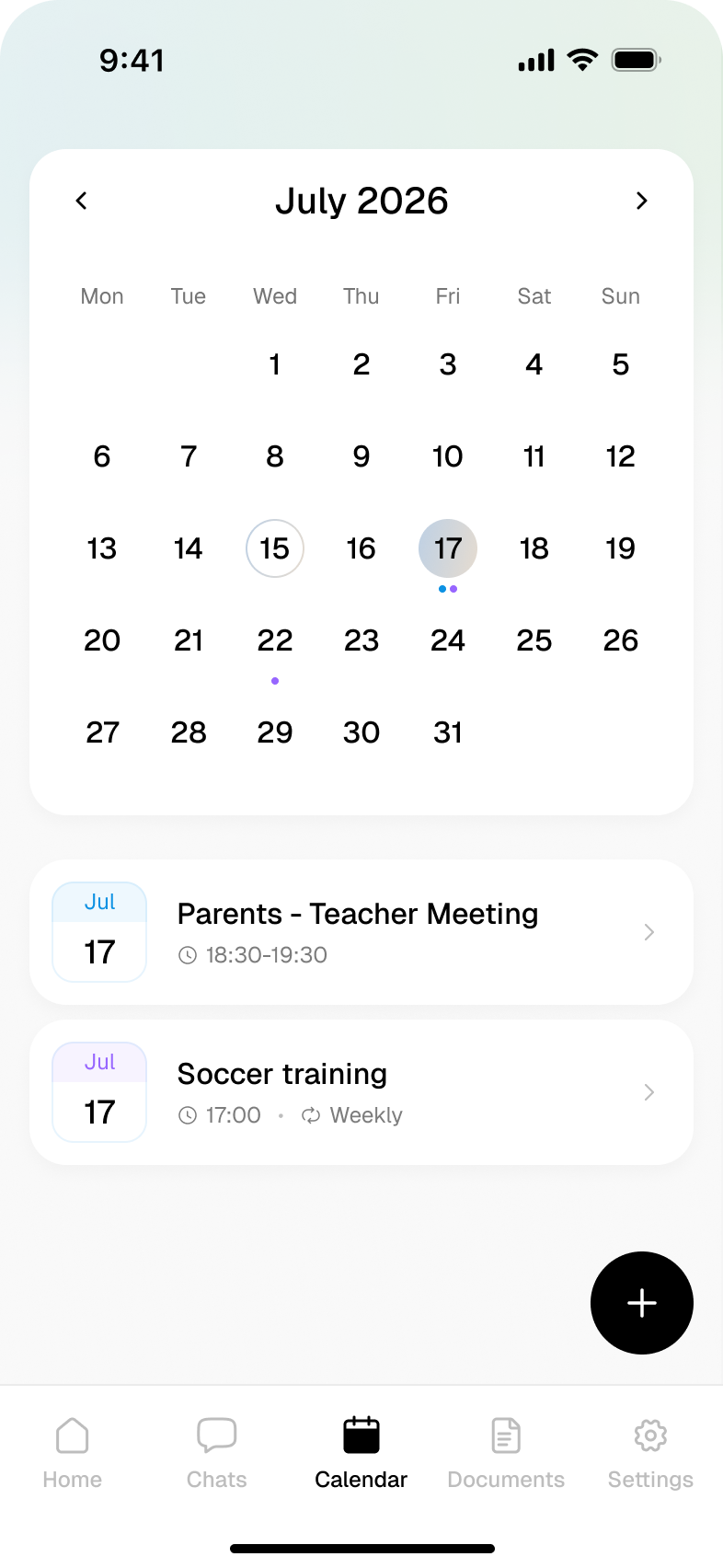
CommonGround brings the practical side of co-parenting together in one place — with free messaging, a shared calendar, important documents and tools to help both parents stay organised.
See how it works →Keep important conversations in one place
Use one dedicated space for co-parenting messages, so conversations about your children stay clear, organised and easy to come back to. Once sent, messages can’t be edited or deleted.
A calendar you both see
Keep handovers, holidays, school dates and appointments in one shared calendar, so both parents stay up to date when plans change.
Important documents, easy to find
Keep photos, school reports, letters and other important documents in one shared place, accessible to both parents. You can also keep your own photos and files in a private album, visible only to you.
How it works
Create your account
Set up your CommonGround account and download the app in just a few minutes.
Invite the other parent
Send an invitation to your co-parent so you can start using your shared space together.
Start co-parenting
Keep both parents informed, organised and focused on what matters most — your children.
Here's what that looks like →
Everything you need for co-parenting
Messaging
Keep co-parenting conversations together in one dedicated place. Messaging is always free.
Shared calendar
Plan handovers, holidays, school dates and appointments in one calendar both parents can see.
Shared documents
Keep photos, school reports, letters and important documents organised and accessible to both parents.
Your private space
Keep your own photos, documents and notes in a private area visible only to you.
Reports
Create clear downloadable reports from the information held within CommonGround when you need them.
Professional access
Choose to give a solicitor, mediator, CAFCASS officer or other professional access to the information you want to share.
Shared Tasks
Keep track of the practical things that need doing. Add shared tasks so both parents can see what needs attention and what’s already been sorted.
Why CommonGround works
Neither parent comes second Both parents use CommonGround on equal terms, with the same access to shared areas.
Share securely with professionals Give a solicitor, mediator, CAFCASS officer or other professional access to the information you choose, for as long as you need.
Co-parenting that fits your situation Every co-parenting arrangement is different. CommonGround gives both parents one shared place to communicate and stay organised.
Your private space stays private. Choose what stays shared and what stays private, with a personal space only you can access.
For solicitors, mediators, CAFCASS and family professionals
Parents stay in control of professional access, choosing what to share and when to remove access.
Always free to message. Upgrade for the full toolkit.
Free
Everything you need to communicate
Fast, simple messaging built for co-parents. Send messages, star anything important and easily return to the information that matters.
Messages are always free and, once sent, can’t be edited or deleted.
Pro
or £49.99 / year
Everything in Free, plus more ways to stay organised
Shared calendar
Shared documents and photos
Your private space
Downloadable reports
Professional access
Plan, organise and keep important information together, while messaging remains free.
Messaging is free forever — no bank card needed. Want more? Try Pro free for 14 days.
Questions about CommonGround
Does the other parent have to join?
No. You can use CommonGround on your own for your calendar, documents and personal records. It becomes more useful when both parents join, as shared calendars and messaging need two people — but you can start using CommonGround today.
Is it really free?
Yes. We believe parents shouldn’t have to pay just to communicate about their children. Messaging on CommonGround is free forever, so whatever your circumstances, you can keep important conversations about your children in one dedicated place.
If you want more tools to help manage co-parenting, you can upgrade to Pro and try it free for 14 days.
Can a message be deleted?
No. Once a message has been sent, it can’t be edited or deleted. It remains visible in the conversation, helping preserve a clear and accurate record of what was said.
Can the other parent see everything?
No. The other parent can only see what you share, including messages, shared calendar events and anything added to the shared documents area. Your private space and account settings remain private to you.
What if we're not really speaking?
You don’t have to be in regular contact to use CommonGround. It gives you a dedicated place to share important information, keep arrangements clear and communicate when you need to.
Can I give a solicitor or CAFCASS access to my records?
Yes. If professional support is needed, you can give a solicitor, mediator, CAFCASS officer or other professional access to the information you choose to share, including a clear record of relevant conversations and arrangements.
Will I know when something is added or shared?
Yes. When a shared action takes place — such as adding a calendar event, sharing a photo or uploading a document — CommonGround adds an activity update to the chat so both parents can see what’s happened.
Can calendar arrangements be changed?
Yes. If a shared calendar event needs changing, CommonGround clearly shows what has changed and asks the other parent to approve the update. This helps make sure changes are clear to both parents.

Everything about your children, in one place
Messaging is free forever. Pro includes a 14-day free trial. Available on iOS and Android.